Telephony for connected AI and human voice operations
Connect HuskyVoiceAI to business numbers, existing phone lines, SIP trunks and supported telephony providers — for AI-led, AI-assisted and human-led inbound and outbound calling.
Business number · Existing line · SIP · Carrier
Routing · Inbound · Outbound · Transfer
AI Voice Agent · Copilot · Human-Led
Intelligence · Workflows · Integrations
One phone layer across every calling mode
Use the same underlying telephony platform whether AI leads the conversation, assists your team or works around a completely human-led call.
AI Voice Agent
Route inbound and outbound calls directly to autonomous AI agents.
AI Voice Copilot
Connect live human calls to an AI assistance layer while your team stays in control.
Human-Led Calling
Let your team make and receive calls while HuskyVoiceAI captures and automates around them.
The telephony layer underneath every voice operation
Keep connectivity separate from how the conversation is handled, understood and connected to the rest of your business.
Use HuskyVoiceAI with or without our telephony
Start with a supported telephony setup or keep your existing carrier and use HuskyVoiceAI as the voice intelligence and workflow layer.
HuskyVoiceAI-managed telephony
Start with a supported number or telephony connection managed as part of your HuskyVoiceAI deployment.
Bring your own telephony
Keep your carrier, phone numbers or SIP infrastructure and use HuskyVoiceAI as the AI, intelligence and workflow layer.
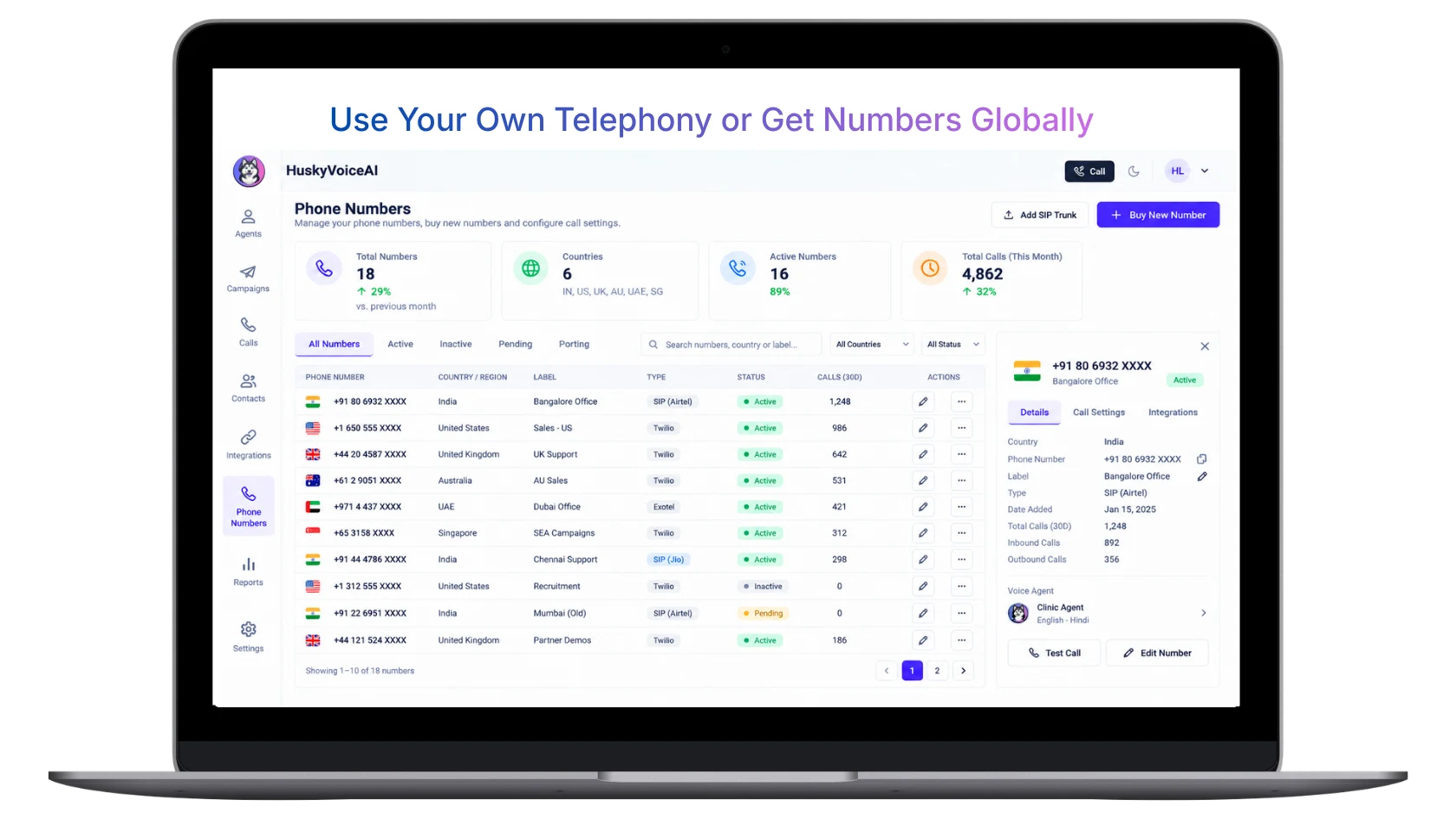
Manage your numbers and telephony from one place
Use supported HuskyVoiceAI numbers or connect your existing telephony, then manage numbers, regions, providers, SIP connections and calling settings from the same platform.
Choose how your phone network connects to HuskyVoiceAI
Start with a new number, retain an existing number, connect through SIP or bring your own telephony infrastructure.
Get a business number
Launch with a dedicated number for a supported market, region, campaign or workflow.
Keep your existing number
Route an existing business number into HuskyVoiceAI through supported forwarding, SIP or carrier configuration.
Connect via SIP
Connect supported SIP infrastructure, telephony providers or regional carriers.
Bring your own telephony
Keep your existing carrier, PBX, SIP trunk or compatible telephony provider and use HuskyVoiceAI as the intelligence layer.
Inbound and outbound calling from one platform
Use the same telephony foundation across inbound reception, outbound campaigns, human-led calling and AI-assisted workflows.
Inbound
Receive customer calls through AI-led, assisted or human-led calling flows.
Outbound
Start automated or human-led conversations from connected outbound workflows.
Connect through supported carriers and telephony providers
Provider availability depends on geography, number type, call direction and deployment requirements.
Airtel SIP
Regional SIP connectivity for supported India business calling deployments.
Twilio
Cloud telephony and SIP connectivity for supported inbound and outbound deployments.
Telnyx
SIP and cloud telephony connectivity for supported global voice deployments.
Exotel
Telephony connectivity for supported India-focused calling and routing workflows.
Plivo
Cloud telephony connectivity for supported voice calling deployments.
Bring Your Own SIP
Connect a compatible customer-owned carrier, PBX, SIP trunk or contact-center telephony layer.
Move between AI and people when the conversation needs it
Telephony is what allows a voice workflow to move between automated conversations, assisted calls and people without treating each mode as a separate system.
AI → Human transfer
Move a live AI conversation to a person when required.
AI → Callback
Capture the need for a callback and route it to the appropriate team.
Human + AI
Use AI Voice Copilot during a live human conversation.
Department routing
Route calls based on number, department, location or workflow.
Build the telephony setup around each market
Use regional numbers, providers, routing and caller strategies based on country, number availability and deployment requirements.
Global coverage
Connect through supported global and regional telephony providers.
Regional number strategy
Use numbers and routing aligned to country, campaign, branch or department.
Country-aware configuration
Account for number availability, caller ID rules, recording requirements and provider support.
Built for more than one conversation at a time
Support concurrent calling, multiple numbers, multiple agents, campaigns and regional routing from one voice operations platform.
Control how calls are placed, routed and escalated
Configure the telephony behavior around your workflow instead of forcing every call into the same routing model.
Calling hours
Control when outbound calls are allowed based on region, campaign or business rules.
Retry rules
Configure retry attempts, spacing, stop conditions and callback behavior.
Number strategy
Use different numbers for regions, campaigns, departments, inbound reception or outbound calling.
Routing
Route calls based on number, department, location, availability, workflow or business rules.
Human handoff
Transfer or escalate calls when a conversation needs a person.
Recording configuration
Configure recording and transcription based on deployment requirements and applicable rules.
Fallback routing
Use alternate routing or supported provider paths where required by the deployment.
Opt-out handling
Respect caller preferences and stop or redirect future outreach where appropriate.
Telephony connects the call. The rest of the platform makes it useful.
Configure calling around your operating requirements
Number availability, recording, caller identification, calling windows and outreach requirements vary by geography and provider. HuskyVoiceAI lets you configure telephony behavior around your deployment, while customers remain responsible for applicable consent and telecom requirements.
Different telephony setups for different voice operations
Business receptionist
Use one main business number for inbound enquiries, appointment calls, routing and after-hours coverage.
Outbound campaigns
Use dedicated numbers and calling rules for follow-up, reminders, screening, feedback and campaign calls.
Multi-location business
Route calls by branch, location, department, number, language or region.
Sales & service teams
Support human-led, AI-assisted and AI-led calling from the same platform.
Enterprise / platform
Keep existing carrier and SIP infrastructure while adding HuskyVoiceAI as the intelligence and workflow layer.
International operations
Use regional numbers, providers and routing strategies based on deployment requirements.
From phone network to live voice operations
Choose your telephony model
New number, existing number, supported provider, SIP trunk or customer-owned telephony.
Connect the number or carrier
Configure the supported telephony path between your phone network and HuskyVoiceAI.
Configure routing
Decide which numbers and calls go to AI agents, humans, departments or workflows.
Test calls & handoff
Test inbound, outbound, transfer, fallback and workflow behavior before launch.
Go live & monitor
Track call status, outcomes, routing, handoffs and connected workflow activity.
Questions about HuskyVoiceAI Telephony
What telephony options does HuskyVoiceAI support?+
HuskyVoiceAI can support new business numbers, existing number routing, SIP connectivity, supported cloud telephony providers and Bring Your Own SIP or telephony setups. Availability depends on geography, provider, number type and deployment requirements.
Does Telephony work across AI Voice Agent, AI Voice Copilot and Human-Led Calling?+
Yes. Telephony is the connectivity layer across all three modes. AI Voice Agent can handle calls autonomously, AI Voice Copilot can assist humans on live calls, and Human-Led Calling keeps the person in control while HuskyVoiceAI captures and automates around the conversation.
Can we keep our existing business number?+
In many deployments, yes. Existing numbers may be routed into HuskyVoiceAI through supported SIP, forwarding or carrier-level configuration depending on your telephony provider.
Can we bring our own SIP trunk?+
Yes. HuskyVoiceAI can support compatible customer-owned SIP trunks, carriers, PBX environments or existing telephony infrastructure where technically supported.
Can we use HuskyVoiceAI without changing our carrier?+
Yes, where your existing carrier or telephony environment can be connected through a supported SIP or routing model.
Does HuskyVoiceAI support inbound and outbound calling?+
Yes. HuskyVoiceAI supports inbound and outbound calling workflows across AI-led and human-led use cases, depending on the telephony setup and geography.
Can AI calls be transferred to a human?+
Yes. Transfer, escalation, callback and internal routing can be configured based on the caller request, business rules or workflow.
Can human-led calls be recorded and transcribed?+
Yes, where configured and permitted. Recording and transcription can be used with Human-Led Calling and other supported calling modes.
Does telephony availability vary by country?+
Yes. Number availability, provider support, caller ID rules, call direction, recording requirements and telecom obligations vary by geography.
Can HuskyVoiceAI support multiple numbers, teams or regions?+
Yes. Telephony can be configured around multiple numbers, departments, branches, campaigns, regions and calling workflows depending on the deployment.
Connect your phone network to HuskyVoiceAI
Tell us how your calling works today — your numbers, provider, SIP setup, regions and workflows. We’ll map the right telephony model for your AI-led and human-led voice operations.
BOOK A TELEPHONY DEMO
Show us your current calling setup
We’ll map how your numbers, SIP, carrier, routing and calling workflows can connect to HuskyVoiceAI.
