Human conversations, with intelligence and automation built around every call
Let your team lead the conversation while HuskyVoiceAI records, transcribes, translates, captures insights and notes, and keeps your systems updated.
Record, transcribe, translate and keep the conversation available for review.
Turn conversations into notes, summaries, outcomes and structured information.
Update systems, trigger follow-up and keep the next action moving.
PERSONALIZED HUMAN-LED CALLING DEMO
See what HuskyVoiceAI can automate around your calls
Tell us how your team handles calls today and we’ll map how recording, transcription, insights, CRM updates and follow-up can fit around them.
Keep the human conversation. Remove the manual work around it.
Your team stays responsible for the conversation. HuskyVoiceAI works around the call to capture what happened, structure the information, update connected systems and prepare the next action.
People continue to handle the conversation directly with the customer.
Recording, transcription, translation, insights, system updates and follow-up.
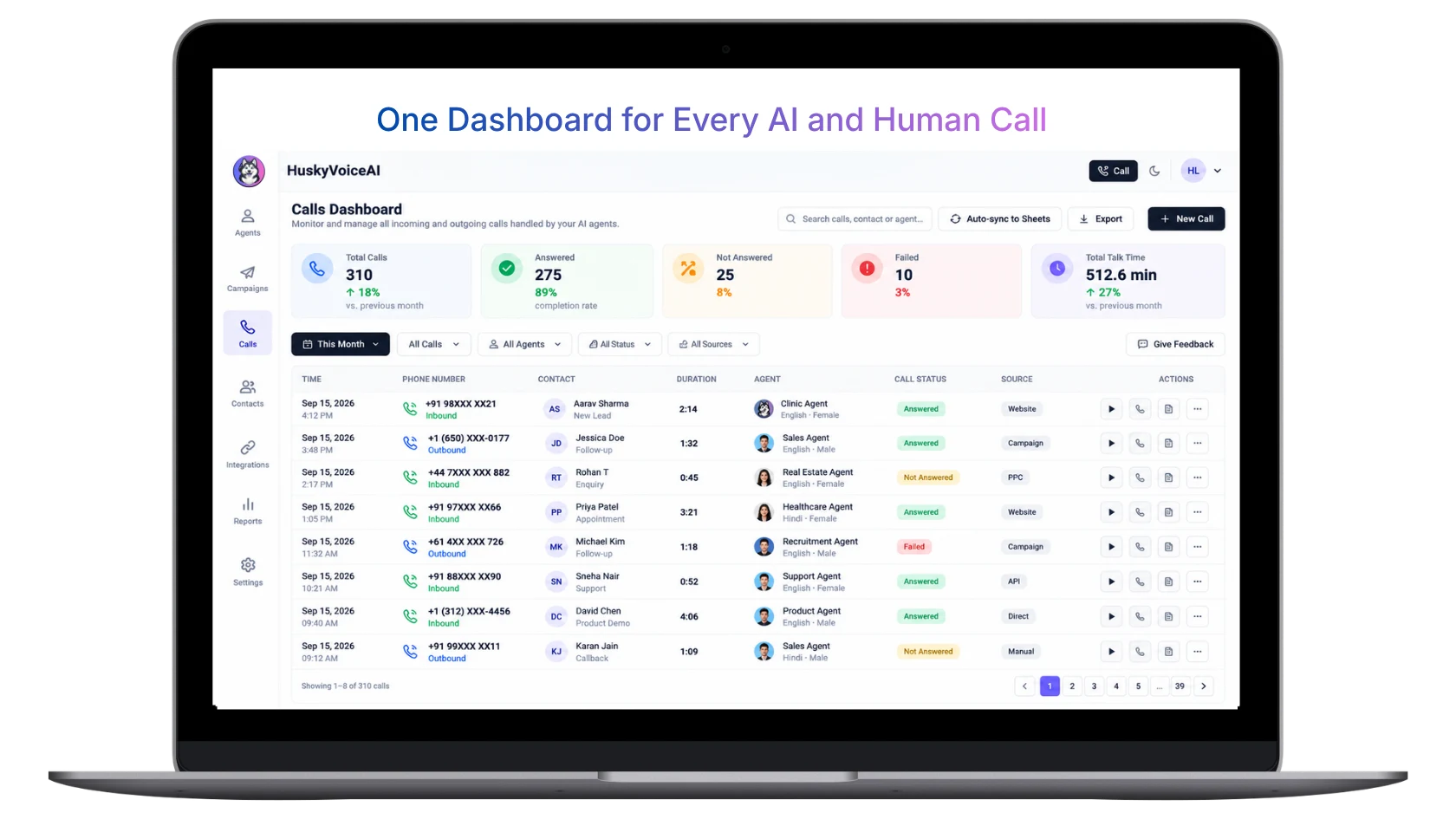
Keep AI-led and human-led calls in one workspace
Let your team make and receive calls while HuskyVoiceAI keeps call history, status, source, duration, recordings and conversation context connected in one place.
Before, during and after every human-led call
Give your team a connected calling workflow without changing who leads the conversation.
Start with customer context
Capture the conversation
Continue the workflow
Turn every phone conversation into searchable, usable information
Capture the original call, convert it into text, translate where needed, and turn the conversation into information your team can actually use.
Your team speaks directly with the customer.
Keep the source conversation where configured.
Convert the conversation into usable text.
Support multilingual review where needed.
Turn the call into information your workflow can use.
Understand what happened without listening to every call
Turn human conversations into structured information that managers, teams and systems can use after the call.
Recording
Keep the original call available for review where configured.
Transcript
Turn spoken conversations into searchable text.
Translation
Make multilingual conversations easier to review and use.
Notes
Capture important details without relying on manual note-taking.
Outcome
Understand what happened and what needs to happen next.
Conversation insights
Turn calls into structured information your business can use.
Stop making your team re-enter what was already said
Use information captured from the conversation to update the systems your team already works in and trigger the next business workflow.
When the call ends, the workflow can continue
Keep the next step moving without making your team manually copy notes, send routine messages or update every system.
Add intelligence to the calling setup your team already uses
Human-Led Calling can work with supported business numbers, SIP, carrier integrations and existing telephony setups depending on your deployment.
Explore Voice AI TelephonyKeep people on the call. Automate the work around them.
Sales teams
Capture qualification context, call notes, outcomes and follow-up without making reps re-enter what was already discussed.
Customer support
Record customer issues, summarize conversations and keep case or account information updated.
Healthcare front desk
Capture appointment-related conversations, notes and administrative follow-up around human-led calls.
Recruitment teams
Record candidate conversations, capture notes and keep the next hiring steps organized.
Collections teams
Capture call outcomes, commitments, notes and follow-up activity consistently.
Operations teams
Turn routine phone conversations into structured records and connected workflow actions.
Human-led with automation — or human-led with live AI assistance
Choose who should lead the conversation
AI Voice Agent
AI speaks with the customer, completes the configured workflow and handles the next steps.
Human-Led Calling
Your team speaks with the customer while HuskyVoiceAI records, structures, updates systems and automates around the conversation.
Add intelligence and automation around the calls your team already handles
Connect your calls
Use a supported telephony setup for your deployment.
Capture the conversation
Record, transcribe and translate where configured.
Extract what matters
Generate notes, summaries, outcomes and structured information.
Continue the workflow
Update systems, trigger follow-up and keep teams aligned.
Your calls. Your team. Your workflow.
Keep visibility into what happened across calls while configuring how information moves into the systems and follow-up processes around them.
Review conversations
Access recordings, transcripts and summaries where configured.
See call outcomes
Understand what happened and what needs attention next.
Configure workflows
Control how captured information moves into business processes.
Track follow-up
Keep the next action visible after the conversation ends.
Questions about Human-Led Calling
What is Human-Led Calling?+
Human-Led Calling means your team continues to conduct the conversation while HuskyVoiceAI works around the call to record, transcribe, translate, capture notes and insights, update connected systems and support follow-up.
How is Human-Led Calling different from AI Voice Copilot?+
In Human-Led Calling, the human conducts the call while HuskyVoiceAI primarily captures, structures and automates around the conversation. AI Voice Copilot adds a stronger live-assistance layer with context, guidance and connected actions available while the human is speaking.
Does HuskyVoiceAI record calls?+
HuskyVoiceAI can support call recording where configured and appropriate for the deployment. Recording availability and requirements depend on the calling setup, geography and applicable rules.
Can HuskyVoiceAI transcribe human calls?+
Yes. Human-led conversations can be transcribed so teams can review what was said, generate summaries and use the information in connected workflows.
Can HuskyVoiceAI translate calls?+
Translation can be included in multilingual workflows where configured, making conversations easier to review and use across teams and languages.
Can it summarize calls and capture notes?+
Yes. HuskyVoiceAI can generate summaries, notes, outcomes, action items and structured information from human-led calls depending on the configured workflow.
Can it update our CRM?+
Yes. Call information can be connected to CRM and other business systems through integrations, APIs, webhooks and workflow automation.
Can it send WhatsApp or email after the call?+
Yes. WhatsApp, email and other supported channels can be included in configured post-call workflows for confirmations, follow-up, alerts and information sharing.
Can Human-Led Calling work with our existing telephony?+
HuskyVoiceAI supports multiple telephony approaches including business numbers, SIP and supported carrier or provider integrations. The right setup depends on your existing infrastructure and deployment requirements.
Can HuskyVoiceAI trigger workflows after a human call?+
Yes. Based on the information captured from the call, HuskyVoiceAI can support actions such as CRM updates, tasks, notifications, callbacks, messaging and API or webhook triggers.
Can managers review calls and outcomes?+
Human-led calls can be turned into recordings, transcripts, summaries, outcomes and structured call information that teams can review based on the configured setup.
Make every human conversation more useful
Keep your team in the conversation while HuskyVoiceAI handles the recording, transcription, insights, system updates and follow-up around it.
BOOK A PERSONALIZED DEMO
Show us how your team handles calls today
We’ll map how recording, transcription, translation, insights, CRM updates and follow-up can work around your human-led conversations.
