Turn voice conversations into connected business workflows
Connect AI-led and human-led calls to CRM, calendars, WhatsApp, email, APIs, webhooks and internal systems — before, during and after every conversation.
CRM · Customer data · Previous interactions
AI-led · AI-assisted · Human-led
Calendar · WhatsApp · Email · APIs
CRM · Webhooks · Internal tools
Appointment booked · CRM updated · WhatsApp sent · Team notified
Connect AI-led, AI-assisted and human-led calls to the same business systems
The workflow changes based on who leads the conversation, but the systems and business outcomes stay connected.
AI Voice Agent
AI can retrieve context, call connected tools, update systems and trigger follow-up while handling the conversation.
AI Voice Copilot
Help your team retrieve context and take connected actions while they handle a live call.
Human-Led Calling
Use captured outcomes and notes from human conversations to update systems and automate post-call work.
The conversation should not end as a transcript
A useful voice workflow connects what happened during the call to the next business action: context retrieved, appointment booked, CRM updated, WhatsApp sent, task created or team notified.
How HuskyVoiceAI Works
See how one dental call becomes completed work.
A dental appointment call, the AI conversation, and the workflow actions — all in sync.
Calling…
AI receptionist is reaching the caller
Before, during, after — and even when the call is unanswered
Configure the workflow around each stage of the conversation instead of treating the phone call as an isolated event.
Load the context the conversation needs
Retrieve relevant information before the conversation starts so the caller or team does not have to repeat what your systems already know.
Connect the conversation to live actions
Retrieve information and trigger configured actions while the conversation is still happening.
Continue the workflow automatically
Move call outcomes into your systems and keep the next business step moving after the conversation ends.
Keep the journey moving
A missed call does not have to end the workflow. Configure retries, messages, callbacks or internal alerts.
Connect voice conversations to the systems your team already uses
Bring customer context into the call and move outcomes back into your operating systems without adding another disconnected tool.
CRM & customer systems
Connect Salesforce, HubSpot, Zoho, custom CRM or internal customer systems to voice workflows.
Calendars & scheduling
Connect Google Calendar, Outlook, Calendly, Cal.com, appointment systems or custom scheduling APIs.
WhatsApp & messaging
Send confirmations, reminders, brochures, payment links, callback messages and other configured follow-ups.
Send customer communication, internal handoffs, summaries, alerts and workflow notifications.
APIs & webhooks
Connect custom business logic with pre-call, in-call and post-call API or webhook actions.
Automation platforms
Connect workflows through tools such as n8n, Make and Zapier where appropriate.
Internal systems
Connect proprietary applications, databases, operational tools and systems of record.
Human teams
Transfer, alert, assign or hand off conversations when a workflow needs a person.
WhatsApp as part of the workflow
Send confirmations, reminders, brochures, payment links, callback messages, customer information and internal alerts through WhatsApp where configured.
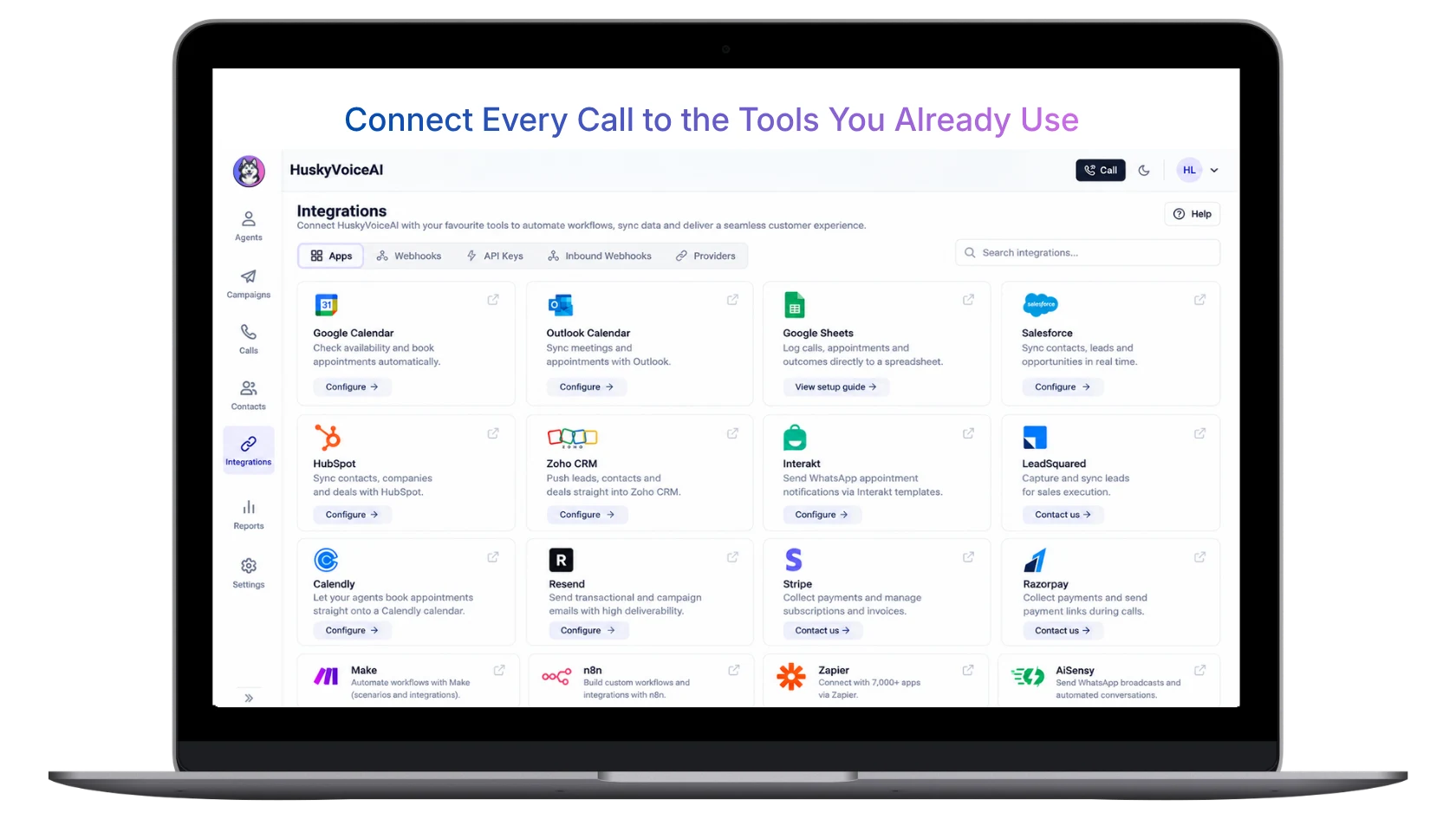
Connect every call to the tools your team already uses
Bring calendars, CRM, spreadsheets, messaging, automation tools, payment systems and your own APIs into the workflows around every conversation.
Reusable actions around every voice conversation
Build workflows from actions that retrieve information, change business systems, message customers and keep work moving.
Retrieve context
Load customer, lead, candidate, appointment, ticket, campaign or account information.
Check or update information
Retrieve availability, validate data, update fields or write information back to connected systems.
Send WhatsApp or email
Send confirmations, reminders, brochures, links, instructions, alerts and follow-up.
Schedule or book
Check available slots, book appointments, reschedule and connect calendar workflows.
Update business systems
Push outcomes, notes, structured fields and call data into CRM, sheets or internal systems.
Trigger next actions
Create tasks, schedule retries, notify teams, transfer calls or trigger custom APIs and webhooks.
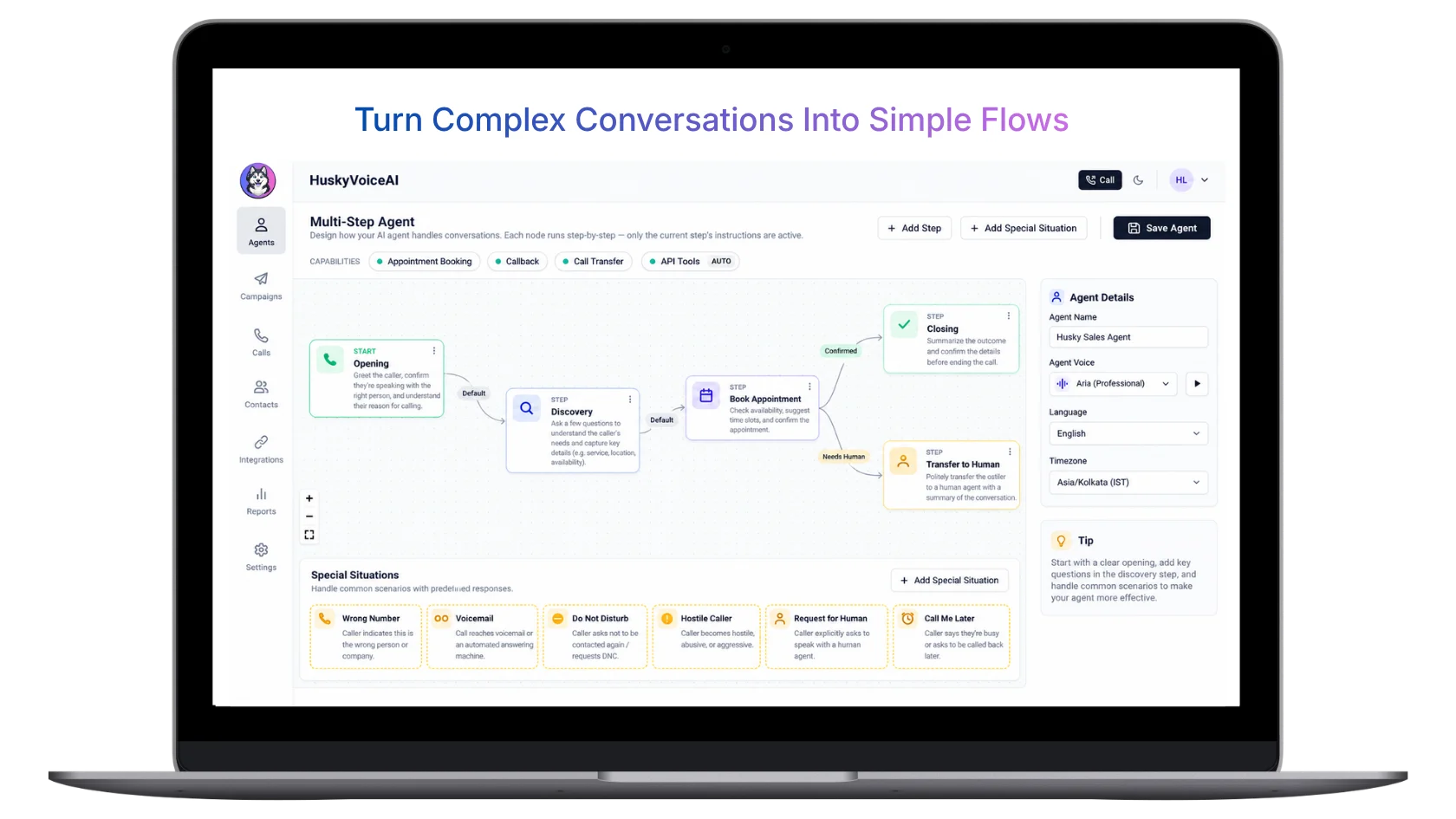
Turn complex conversations into controlled flows
Break conversations into clear steps, define actions, handle special situations, and decide when the workflow should continue automatically or move to a person.
Connect different conversations to the right business outcome
The same workflow layer can support very different customer journeys by changing the context, business rules and actions around the conversation.
Appointment booking
For clinics, salons, service businesses, admissions teams and appointment-driven workflows.
Load customer, branch, service, doctor or previous appointment context.
Check availability, book or reschedule, and confirm the preferred slot.
Update the calendar and store the appointment outcome.
Send WhatsApp or email confirmation and schedule a reminder.
Lead qualification
For inbound enquiries, campaign leads, missed calls and sales follow-up.
Load lead source, campaign, company, CRM owner and previous engagement.
Capture intent, qualification answers and the next sales step.
Update CRM, qualification status and owner.
Send a WhatsApp callback option or schedule the next interaction.
Recruitment screening
For candidate screening, interview coordination and recruiter workflows.
Load candidate details, role, resume context and recruiter information.
Capture screening responses, availability and interview readiness.
Update candidate status and notify the recruiter.
Send job details, interview confirmation or scheduling information.
Real estate enquiry
For property enquiries, qualification, brochure sharing and site visits.
Load project, lead source, location, budget and property interest.
Capture requirements, qualification context and site-visit intent.
Update lead status and notify the appropriate sales owner.
Send brochure, map, WhatsApp follow-up or site-visit confirmation.
Customer feedback
For feedback collection, customer check-ins, NPS and service review workflows.
Load customer segment, account owner and relevant product or service context.
Capture score, reason, feedback, issue or follow-up requirement.
Store feedback and update the customer record.
Alert the account team or send a feedback acknowledgement.
Support & operations
For issue capture, routing, callbacks, escalation and operational workflows.
Load account, order, ticket, branch or previous support context.
Capture the issue, urgency, relevant information and desired next step.
Create or update a ticket and route it to the right team.
Send status information, callback confirmation or internal alerts.
Start with common workflows. Extend when your business needs more.
Common business actions
Configure recurring workflow patterns around calls without building every business action from scratch.
Your systems and business logic
Extend HuskyVoiceAI into proprietary systems, custom APIs and more complex operational workflows.
Advanced integrations and custom workflow requirements can be scoped with the HuskyVoiceAI team.
Automate actions without losing control
Decide which actions can happen automatically, which need human confirmation and when a conversation should move to a person.
Configurable permissions
Control which workflow actions and connected systems are available for each use case.
Human confirmation
Keep selected actions under human approval when the workflow requires review.
Human handoff
Transfer, escalate or notify people when a caller or business rule requires human intervention.
Workflow rules
Define when actions should run based on call stage, outcome, business logic or caller context.
Retry controls
Configure retry, callback or follow-up behavior when the first call does not complete the workflow.
Activity visibility
Review call outcomes, actions, handoffs and downstream workflow activity.
Need to understand what happened across calls?
Conversational Intelligence turns AI-led and human-led conversations into recordings, transcripts, translations, summaries, outcomes and structured business data.
Explore Conversational IntelligenceQuestions about Workflows & Integrations
What are Workflows & Integrations in HuskyVoiceAI?+
Workflows & Integrations connect voice conversations to the business systems and actions around them. Depending on the calling mode and configuration, HuskyVoiceAI can retrieve context, call tools, update records, send messages, trigger APIs, notify teams and continue follow-up before, during or after a conversation.
Do workflows work with AI Voice Agent, AI Voice Copilot and Human-Led Calling?+
Yes. The role of the workflow depends on the calling mode. AI Voice Agents can trigger configured actions directly, AI Voice Copilot can assist a person with connected actions during a live call, and Human-Led Calling can use captured outcomes to update systems and automate work around the conversation.
Can workflows run before the call starts?+
Yes. Pre-call workflows can retrieve CRM information, customer context, appointment history, candidate details, campaign information or other data before the conversation begins.
Can HuskyVoiceAI trigger actions during a live call?+
Yes. Depending on the workflow, HuskyVoiceAI can retrieve information, check availability, call APIs, send messages, update data, schedule appointments or trigger other connected actions while the conversation is happening.
Can HuskyVoiceAI send WhatsApp messages?+
Yes, where configured. WhatsApp can be used for confirmations, reminders, brochures, callback messages, payment links, follow-up and other workflow communication.
Can HuskyVoiceAI update our CRM?+
Yes. HuskyVoiceAI can connect conversation outcomes, notes and structured information to CRM and other business systems through integrations, APIs, webhooks or configured workflows.
Can we connect our own APIs and internal systems?+
Yes. Custom APIs, webhooks and internal systems can be connected depending on the workflow and deployment requirements.
What happens if a call is unanswered?+
An unanswered-call workflow can schedule a retry, send WhatsApp, email or SMS, offer a callback, notify the owner or update the call outcome.
Does HuskyVoiceAI have a visual drag-and-drop workflow builder?+
HuskyVoiceAI currently supports configured reusable actions and workflow orchestration across the call lifecycle. A visual drag-and-drop workflow builder is not the primary workflow interface today.
Can workflows include human approval or handoff?+
Yes. Workflows can be designed so selected actions require human review, or so conversations are transferred, escalated or assigned to people when needed.
Connect every voice conversation to what needs to happen next
Show us one of your real call journeys and the systems around it. We’ll map the context, actions, integrations and follow-up into a connected HuskyVoiceAI workflow.
BOOK A PERSONALIZED DEMO
Show us the workflow around your calls
We’ll map how voice conversations can connect to your CRM, calendar, WhatsApp, APIs, internal systems and follow-up.
