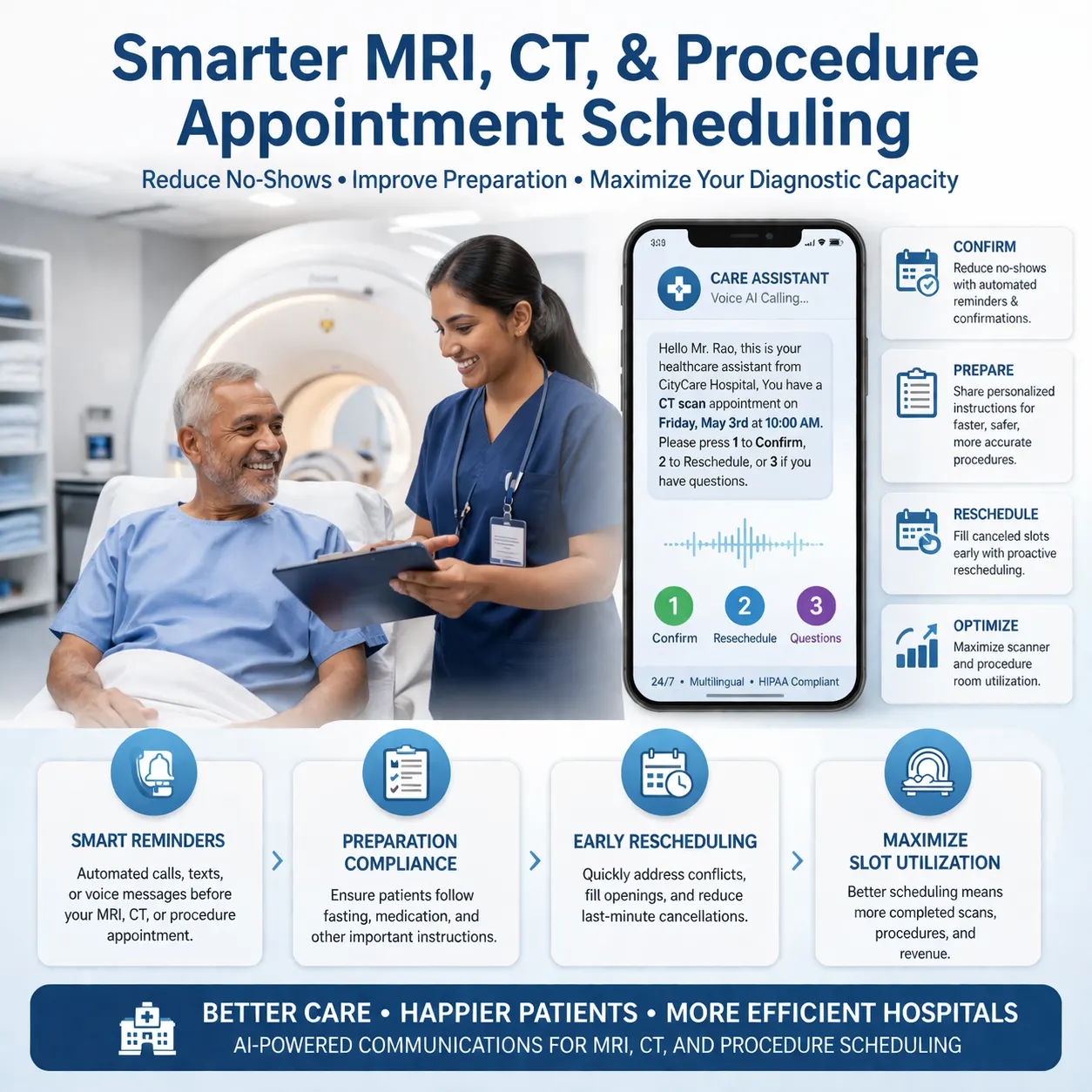
A patient has an appointment tomorrow.
The clinic needs to make sure they remember, understand the timing, and know how to reschedule if they cannot attend.
There are two common ways to do this.
Send a text reminder.
Or make a reminder call.
Both can reduce missed appointments. But they work differently, and the best choice depends on the patient, appointment type, specialty, and clinic workflow.
For many clinics, the right answer is not calls or texts.
It is using both in the right places.
Why appointment reminders matter
Patient no-shows create empty provider slots, lost revenue, delayed care, front-desk workload, and longer wait times for other patients.
Many no-shows are not intentional. Patients forget, cannot take time off, have transport issues, feel better, feel anxious, or need to reschedule but cannot easily reach the clinic.
Appointment reminders help because they bring the appointment back into the patient’s attention before the slot is lost.
Research supports this. A Cochrane review found that mobile text message reminders improved attendance compared with no reminders, and also found that text reminders had a similar impact to phone call reminders in the studies reviewed. Cochrane’s review on mobile phone reminders is a useful starting point for clinics comparing reminder methods.
What are text appointment reminders?
Text appointment reminders are SMS or messaging reminders sent to patients before a scheduled appointment.
A simple text reminder may look like this:
Hi Sarah, this is Green Valley Clinic. You have an appointment with Dr. Smith tomorrow at 10:30 AM. Reply 1 to confirm or 2 to reschedule.
Text reminders are popular because they are fast, inexpensive, and easy to automate.
They work well when the patient only needs a simple reminder and can respond quickly.
What are patient appointment reminder calls?
Reminder calls are phone calls made to patients before an appointment.
They may be done manually by front-desk staff, by an automated system, or by an AI voice agent.
A reminder call can sound like this:
Hi, this is Maya, an AI assistant calling on behalf of Green Valley Clinic. I’m calling to confirm your appointment with Dr. Smith tomorrow at 10:30 AM. Will you be able to attend?
If the patient says no, the call can continue:
No problem. Would you like the clinic team to help reschedule? I can collect your preferred day and time.
This is the main advantage of reminder calls: they can become a conversation.
Calls vs texts: quick comparison
| Area | Text reminders | Reminder calls |
|---|---|---|
| Cost | Usually lower | Usually higher if manual; scalable with AI voice |
| Speed | Very fast to send | Takes longer per patient |
| Patient effort | Low if patient reads and replies | Low if patient answers the call |
| Conversation depth | Limited | Stronger |
| Best for | Routine reminders and confirmations | High-risk, complex, procedure-heavy, or unconfirmed appointments |
| Rescheduling | Works if reply flow is simple | Can collect preferred times conversationally |
| Older patients | May vary by patient preference | Often useful when patients prefer phone calls |
| Preparation instructions | Good for short instructions or links | Better when instructions need confirmation |
When text reminders work best
Text reminders are best when the reminder is simple and the patient is likely to read and respond.
They work well for:
- Routine clinic visits
- Dental checkups
- Follow-up consultations
- Therapy appointments
- Basic confirmation reminders
- Low-risk appointment types
- Patients who prefer messaging
Text reminders are also useful because they can include date, time, location, and rescheduling instructions in a compact format.
A good reminder text should be short, clear, and actionable.
When reminder calls work best
Reminder calls work best when the clinic needs more than a simple confirmation.
They are useful for:
- High-risk no-show patients
- Older patients who prefer phone calls
- Procedure appointments
- MRI, CT, ultrasound, or diagnostic appointments
- Appointments with preparation instructions
- New patients
- Patients who did not respond to text reminders
- High-value specialist appointments
- Appointments booked far in advance
A 2024 radiology study found that personalized phone call reminders seemed more effective than SMS in reducing missed appointments, especially among older patients. The PubMed abstract on personalized phone calls and SMS reminders highlights why patient demographics and preferences matter when designing reminder workflows.
Why calls are useful for procedure appointments
Some appointments need more than a reminder.
For example, a diagnostic or procedure appointment may require the patient to fast, bring documents, stop certain medications only as advised by their clinician, arrive early, or arrange transport.
A text reminder can send instructions.
A call can confirm whether the patient understood them.
For procedure-heavy appointments, a reminder call can ask:
- Will you be able to attend?
- Have you received the preparation instructions?
- Do you need help rescheduling?
- What time works better if you cannot attend?
The AI or staff member should not give medical advice beyond approved clinic instructions. But the call can identify when a patient needs staff help.
Why texts are still important
Reminder calls are powerful, but they should not replace text reminders for every patient.
Texts are useful because they are scalable.
They can be sent to many patients quickly. They are easy to automate. They let patients check the appointment details later. They can include a map link, clinic phone number, rescheduling instructions, or preparation link.
A Cochrane review found that SMS reminders improved attendance compared with no reminders and had a similar impact to phone call reminders in the reviewed studies. It also found that SMS reminders cost less per attendance than phone reminders in the included evidence. The Cochrane review summary on appointment reminder systems explains the evidence and cost comparison in more detail.
For many clinics, SMS should remain the default for routine appointments.
Why phone calls are harder to scale manually
The main challenge with reminder calls is staff time.
Manual reminder calls can create front-desk workload.
Staff may need to call patients, wait for answers, leave messages, update appointment status, collect reschedule requests, and repeat the process for every unconfirmed patient.
This becomes difficult when the clinic has:
- High appointment volume
- Multiple doctors
- Many unconfirmed patients
- Procedure-heavy schedules
- Frequent reschedules
- Long waitlists
That is where automated voice or AI voice reminders can help.
Where AI voice reminders fit
AI voice reminders sit between manual phone calls and basic automated messages.
An AI voice agent can call patients, confirm whether they will attend, ask if they need to reschedule, collect preferred times, and send a structured summary to the clinic team.
For example:
Hi, this is Maya, an AI assistant calling on behalf of Green Valley Clinic. I’m calling to confirm your appointment tomorrow at 10:30 AM. Will you be able to attend?
If the patient says they cannot attend:
No problem. Would you like the clinic team to help reschedule? What day or time works better for you?
The clinic receives a summary like:
Patient: Sarah Miller
Appointment: Tomorrow at 10:30 AM
Status: Cannot attend
Reason: Work conflict
Preference: Next Tuesday afternoon
Next step: Front desk to confirm new slot
This makes reminder calls more scalable without adding the same front-desk workload.
Best workflow: use both calls and texts
The strongest reminder workflow usually combines texts and calls.
For example:
- Send text confirmation when the appointment is booked.
- Send SMS reminder 48–72 hours before the appointment.
- Ask patient to confirm, cancel, or reschedule.
- If the patient does not respond, trigger an AI voice reminder call.
- For high-risk or procedure appointments, use a phone call even if SMS was sent.
- If the patient cannot attend, collect reschedule preference.
- Use a waitlist workflow to fill the opened slot.
This approach keeps routine reminders low-cost while giving high-risk appointments more attention.
Suggested workflow by appointment type
| Appointment type | Recommended reminder workflow |
|---|---|
| Routine follow-up | SMS reminder with confirm/reschedule option |
| New patient visit | SMS plus call if unconfirmed |
| Procedure appointment | SMS plus reminder call to confirm instructions |
| MRI / CT / diagnostic appointment | SMS plus phone or AI voice confirmation |
| Repeated no-show patient | Phone or AI voice reminder with reschedule option |
| High-demand doctor slot | SMS plus confirmation call if no response |
| Therapy or recurring appointment | SMS reminder, with phone call after repeated missed sessions |
What reminder messages should include
Whether you use text or voice, the reminder should be clear.
Include:
- Clinic name
- Doctor or department name, if appropriate
- Appointment date and time
- Location or telehealth link
- Arrival instructions, if needed
- Simple confirm/cancel/reschedule option
- Clinic contact number
Avoid overloading the reminder with too much information.
If instructions are complex, link to instructions or have staff follow up.
What reminders should not do
Appointment reminders should be operational and privacy-conscious.
They should not:
- Include unnecessary sensitive medical information
- Give medical advice
- Make clinical decisions
- Pressure patients who need to reschedule
- Use confusing links or unclear sender names
- Make it hard to opt out where required
Clinics should align reminder content with their privacy, consent, and communication policies.
How to choose between reminder calls and text reminders
Use this simple decision guide.
| Situation | Better reminder option |
|---|---|
| Routine appointment | Text reminder |
| Patient has not confirmed | Reminder call or AI voice call |
| Older patient or phone-preferred patient | Reminder call |
| Procedure with preparation instructions | Text plus reminder call |
| High-risk no-show patient | Reminder call or AI voice call |
| Large volume of low-risk appointments | Text reminder |
| Patient needs to reschedule | Call or AI voice workflow to collect preference |
How HuskyVoiceAI helps clinics with reminder calls
HuskyVoiceAI helps clinics automate inbound and outbound phone call workflows using AI voice agents.
For appointment reminders, HuskyVoiceAI can support:
- Appointment confirmation calls
- Reminder calls for unconfirmed patients
- Procedure reminder calls
- No-show follow-up calls
- Reschedule request collection
- Waitlist activation calls
- Call summaries, transcripts, and next steps
- Human escalation when patients need staff support
HuskyVoiceAI can work alongside SMS reminders rather than replacing them. Text reminders can handle routine confirmations, while AI voice calls can focus on high-risk, high-value, unconfirmed, or procedure-heavy appointments.
Real AI agents, not IVR menus.
HuskyVoiceAI handles real conversations, captures context, and routes the right next step.
Related resources
- How clinics can reduce patient no-shows
- Doctor appointment rescheduling AI
- Reduce missed MRI and CT procedure appointments with voice AI
- AI appointment booking for independent clinics
- Healthcare voice AI
- Book a HuskyVoiceAI demo
Final thought
Text reminders and appointment reminder calls both help clinics reduce missed appointments.
Text reminders are low-cost, fast, and scalable.
Reminder calls are more conversational and better for high-risk, older, unconfirmed, or procedure-heavy appointments.
The best clinic workflow often uses both: SMS for routine reminders, AI voice or phone calls for appointments that need confirmation, rescheduling, or extra attention.
The goal is not just to remind the patient.
The goal is to protect the appointment slot, reduce front-desk workload, and make it easier for patients to show up or reschedule in time.



